
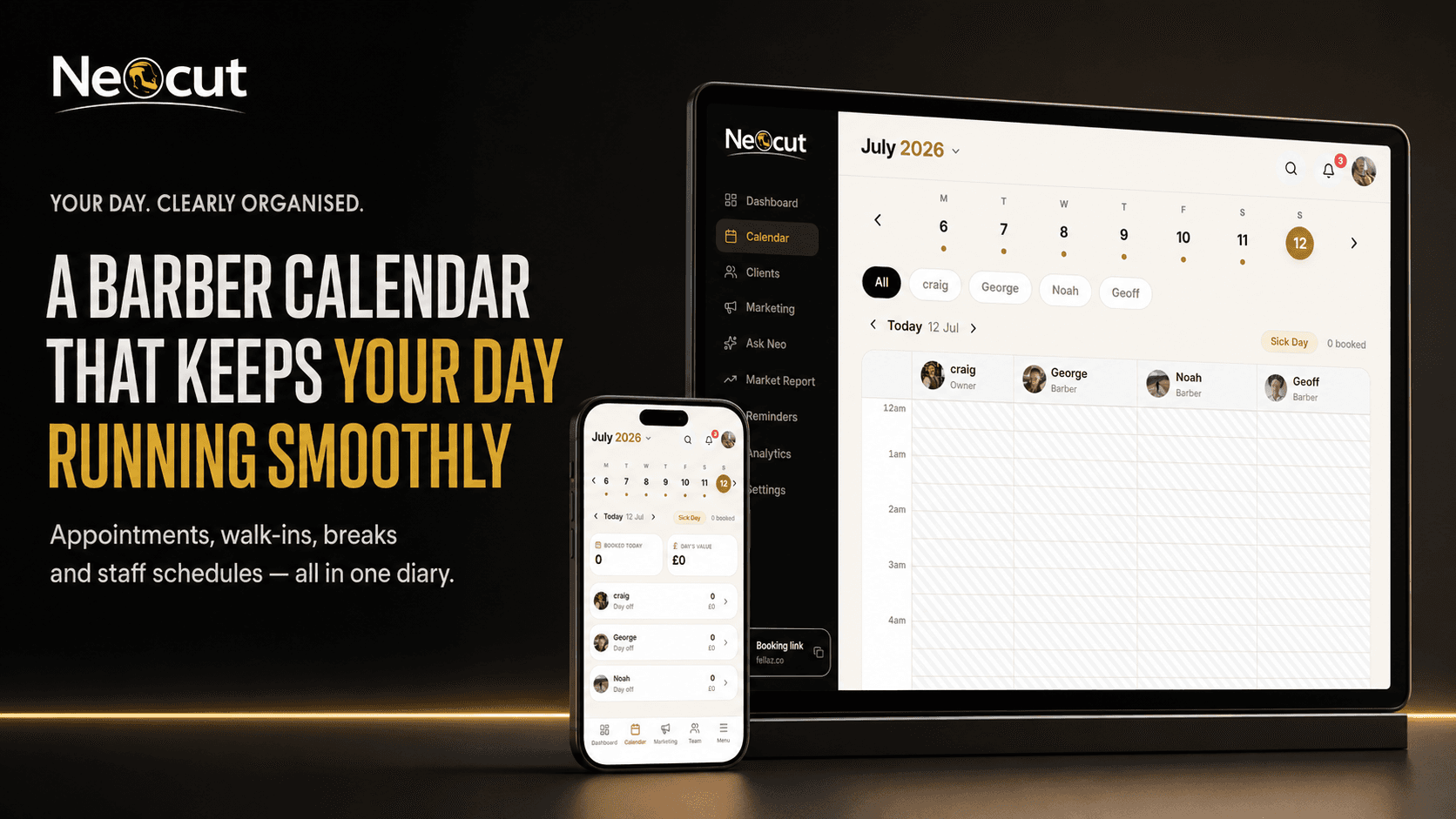
Your diary controls the working day
When the diary is clear, the day feels manageable — you know who's coming in, which service they've booked, how long you have, where the gaps are and whether you've got time to eat. When it's messy, appointments overlap, walk-ins get squeezed into the wrong gaps, clients arrive expecting a booking you can't find and barbers don't know what their day looks like. Encorra is a barber appointment calendar designed around the way real shops actually operate.
See the day clearly
Open Encorra for a straightforward view of what's happening now and what's next:
- Appointment times
- Client names
- Booked services
- Assigned barber
- Service duration
- Appointment status
- Available spaces
- Breaks & blocked periods
- Walk-ins
- Working hours
No paper pages, no complicated spreadsheet, no scrolling through messages to work out who booked what.
One connected diary for the whole shop
One calendar for the whole team
Individual staff calendars in one system. Switch between barbers to check today's appointments, availability, hours, breaks, days off and holidays — one shop-wide view without losing each barber's detail.
A calendar per barber
Each barber has their own working days, hours, breaks, services, durations, availability, holidays and permissions — and Encorra uses that setup to organise their appointment calendar.
Book straight into the right diary
Clients choose a service, barber, date and time on your booking page and the appointment drops into the correct barber's calendar — no copying from an Instagram message, no separate paper diary.
Genuine, duration-aware availability
A 30-minute service needs a real 30-minute space. Availability is calculated from existing bookings, service duration, hours, breaks, blocked time, holidays and how far ahead the diary is open.
Prevents double bookings
Encorra checks the barber's calendar — start time, end time and service duration — before showing or accepting a slot, so appointments don't overlap accidentally.
Add walk-ins
Record client, barber, service, start time, duration and status so walk-ins and online bookings live in the same diary — remaining availability stays accurate and the owner sees the real day.
Move without deleting
Authorised users can change an appointment's time, date, barber, service, duration or status without deleting and recreating it — the original booking and its details stay intact.
Change duration, release the gap
When a booking needs less time than expected, reducing the duration updates the end time — and if the freed period is safe and conflict-free, it can reopen for another booking. Small gaps add up.
Block time when unavailable
Lunch, training, cleaning, deliveries, an early finish — block it so clients aren't offered those times, and the rest of the day stays bookable. No fake client booking needed.
Set working hours per barber
Availability starts when the barber starts and finishes when they stop. Each barber can have a different schedule, and the booking calendar uses those hours.
| Monday | Closed |
| Tuesday | 9am–6pm |
| Wednesday | 10am–7pm |
| Thursday | 9am–8pm |
| Friday | 9am–6pm |
| Saturday | 8am–4pm |
| Sunday | Closed |
Holidays & sick days from the calendar
Choose the dates a barber is away and Encorra closes them to new bookings, finds affected appointments, notifies clients and sends rebooking options — so nobody books a barber who's off.
A sick day can turn a calm morning into chaos. The sick-day workflow helps identify the booked clients, support notifications and move them towards available replacement appointments — instead of working down the diary one person at a time.
Understand the day at a glance
Encorra helps distinguish completed, current, upcoming, cancelled and no-show appointments, walk-ins, blocked time and available gaps — so you're never left wondering whether someone has already been served or is still expected. And the mobile-first calendar brings you close to what's happening now, so you're not scrolling from 7am to find the current time when you check between haircuts.
Manage the diary from any device
On your phone
Mobile-first, so you can view appointments, check client details, add a walk-in, move a booking, block time and switch barber calendars between haircuts — or check tomorrow from home.
As an iPad diary
Place a tablet at reception to view the shop calendar, add appointments, check clients in, review staff availability and add walk-ins. Keep staff access protected and sensitive info off-screen.
On a desktop
Owners can use a larger screen to review multiple barber calendars, longer date ranges, staff availability, upcoming holidays and shop performance — same data, no separate diaries to maintain.
The same appointment information stays connected across supported devices — you aren't maintaining separate mobile and desktop diaries.
Find spaces and gaps fast
When a client asks "what have you got this week?", view availability by service, barber, day, hours, existing bookings and duration instead of scanning every diary. An empty slot can disappear in a busy calendar — Encorra makes gaps visible so you can fill, promote, offer to a walk-in or block them. You can't fill what you can't see.
Refill cancellations with a Smart Waitlist
When a booked client cancels, the Smart Waitlist offers the space to suitable waiting clients — they get a message, open the link and claim it, and the calendar updates. The diary starts refilling itself while you carry on cutting.
Confirmations, reminders & client records
On paid plans, bookings trigger SMS/email confirmations and reminders. Tap into any appointment to see the client's history, usual barber, services, notes, no-show info and predicted return date — the calendar tells you who's coming; the record helps you understand them.
Control who can change the diary
Staff roles decide who can view all calendars or only their own, add, move or cancel appointments, override rules, change hours or manage time off. Important changes are recorded via an audit trail — the system assists, but sensitive actions stay behind the authorised user's confirmation.
Barber appointment calendar vs a paper diary
| Paper barber diary | Encorra barber calendar |
|---|---|
| Kept inside the shop | Accessible from supported devices |
| Updated manually | Online bookings update the diary |
| Hard to share across staff | Individual barber calendars |
| Availability checked by eye | Availability calculated from booking rules |
| Easy to double-book by accident | Scheduling conflicts are checked |
| Walk-ins may not be recorded | Walk-ins join the same calendar |
| No automatic reminders | SMS and email reminders available |
| Holidays crossed out manually | Dates can be blocked properly |
| No client history attached | Appointments connect to client records |
| Empty gaps overlooked | Available spaces are easier to spot |
Paper diaries can record appointments. They can't help manage what happens around them.
Barber calendar vs a generic calendar app
| Generic calendar | Encorra |
|---|---|
| Creates events | Creates barber appointments |
| No service durations | Services control booking length |
| No client booking page | Clients can book online |
| No barber selection | Separate calendars for staff |
| No client records | Bookings connect to client history |
| No waitlist | Smart Waitlist helps fill cancellations |
| No no-show protection | Card-on-file tools available |
| No barber analytics | Appointment and revenue reporting |
| Built for general events | Built around barbershop workflows |
A generic calendar knows you're busy at 2pm. Encorra knows who's booked, which barber they're seeing and how long the service should take.
Simple calendar for solo barbers
Work alone? You don't need a complicated team platform. The Free Forever Starter plan gives one barber an online booking page, appointment calendar, client list and one staff profile — start with the essentials and upgrade later for reminders, analytics or marketing.
See the free planAppointment diary for multi-barber shops
As the team grows, the diary gets more complicated — different hours, different services, overlapping holidays, client preferences. Encorra Business brings up to 5 barbers into one system with no per-chair fee: the owner gets the wider view, each barber gets the diary that's relevant to them.
Barber staff scheduling
Built by someone who has worked from the diary
I'm Craig Mariner. I opened my first barbershop at 17 and have spent more than 20 years behind the chair. I've used paper diaries, generic calendar apps and booking systems built for every industry imaginable — and the same problem kept appearing: the diary was either too basic to help or so complicated that checking the next client became a job in itself.
I wanted a barber calendar that made the day clear — one that understood services, appointment lengths, walk-ins, staff hours, cancellations and how regulars return. So I built Encorra inside a working barbershop. It now runs my own calendar too.
Choose the right Encorra plan
🔥 Launch offer: £10 off every month for your first 2 months
Starter
Free forever
For solo barbers who need the essential booking tools.
- Online booking page
- Appointment calendar
- Client list
- One staff member
No long contract — cancel anytime. Also see the barber booking app, the complete barber booking system or how Encorra compares.
How to create a barber scheduling calendar online
- 1Create your Encorra accountChoose the plan that fits your current business.
- 2Add your barbersCreate staff profiles and set the correct permissions.
- 3Set working hoursChoose start times, finish times, breaks and days off.
- 4Add your servicesEnter the price and duration of each service.
- 5Assign services to barbersChoose which team members provide each service.
- 6Add blocked time and holidaysClose periods that shouldn't be bookable.
- 7Share your booking pageClients begin selecting appointments that fit the diary.
- 8Complete a test bookingCheck it appears correctly in the selected barber's calendar.
Frequently asked questions
What is a barber appointment calendar?
A digital diary that organises client bookings, services, staff availability, breaks and time off. An online calendar can also connect directly to a client booking page.
Can clients book directly into the calendar?
Yes. Clients use your Encorra booking page to select a service, barber, date and time, and the booking enters the appropriate barber calendar.
Is there a free barber calendar?
Yes. The Free Forever Starter plan for one barber includes an online booking page, appointment calendar and client list.
Can I use Encorra as a barbershop calendar?
Yes. Encorra supports solo barbers and multi-barber shops. The Business plan can manage up to 5 barbers in one connected system.
Can every barber have their own diary?
Yes. Each barber can have individual working hours, services, breaks, holidays and appointments.
Can staff only see their own calendar?
Yes. Staff permissions can restrict barbers to their own bookings while owners keep access to the wider shop.
Does Encorra help prevent double bookings?
Yes. Encorra checks existing appointments, service duration, working hours and blocked time when calculating availability.
Can I add walk-in appointments?
Yes. Walk-ins can be added to the calendar so remaining availability stays accurate.
Can I move an appointment?
Yes. Authorised users can change an appointment's date, time, service, barber or duration.
Can I change an appointment's duration?
Yes. When the new duration creates a safe, conflict-free period, the remaining space can be released.
Can I block lunch breaks?
Yes. Add blocked time for lunches, meetings, personal appointments or other periods that shouldn't be bookable online.
Can I add staff holidays?
Yes. Holiday dates can be closed to new bookings, and Encorra can assist with affected client appointments.
Does Encorra have a sick-day feature?
Yes. Encorra includes tools to help identify, notify and rebook clients affected when a barber is unexpectedly unable to work.
Can I use the calendar on my phone?
Yes. Encorra is designed around mobile access, so barbers can check and manage the diary from their phone.
Can I use Encorra on an iPad?
Yes. Encorra can be accessed through supported tablet and browser experiences; the layout adapts to the screen size.
Can I use it on a desktop computer?
Yes. Owners can use a larger screen to view calendars, appointments and business information.
Does the calendar send reminders?
Automatic SMS and email reminders are available on supported paid plans.
Can it fill cancelled appointments?
Yes. The Smart Waitlist can offer an available appointment to interested clients and let them claim it through a link.
Can I search for available times?
Yes. Encorra displays availability based on the barber, service duration, working hours and existing appointments.
How far ahead can clients book?
The shop can control how far into the future online appointments are made available.
Can I import appointments from another diary?
Available import options depend on the system you're leaving; supported client data can be imported by CSV.
Related guides
One clear calendar for the whole shop
A good barber calendar doesn't need to feel clever — it needs to be clear. Open it, understand the day and make a change without creating another problem. Encorra brings appointments, barbers, walk-ins, breaks and availability into one connected diary, so the day keeps moving.
No contract. Cancel anytime.